CI/CD Integration
ReadyStackGo integrates with automated build and release processes. Using API Keys and Webhook Endpoints, CI/CD pipelines can trigger deployments, perform upgrades, and synchronize the stack catalog.
Overview
Section titled “Overview”| Use Case | Webhook | Description |
|---|---|---|
| Dev/Test | /api/hooks/redeploy | Automatically redeploy the stack after every build (fresh images) |
| Release | /api/hooks/upgrade | Upgrade to a new catalog version |
| Catalog Sync | /api/hooks/sync-sources | Update the catalog after manifest changes |
Step by Step: Creating an API Key
Section titled “Step by Step: Creating an API Key”Pipeline access uses API Keys instead of JWT tokens. Here’s how to create one:
Step 1: Open Settings
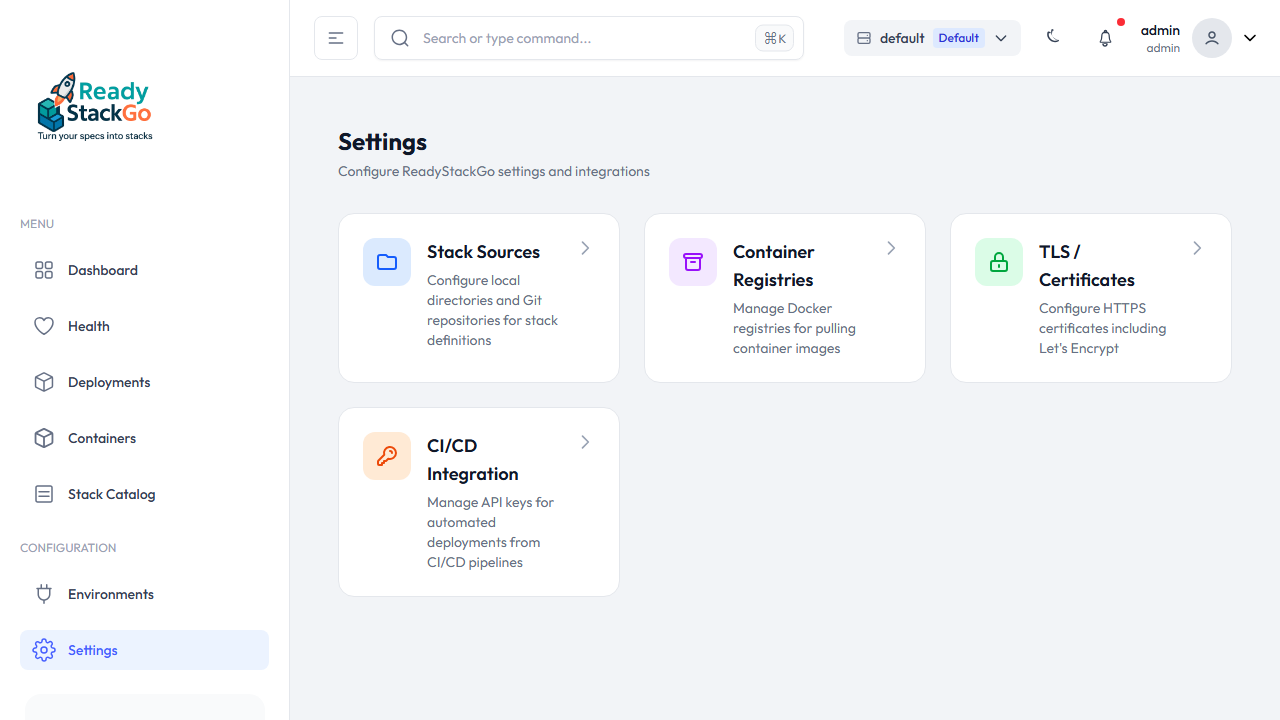
Section titled “Step 1: Open Settings”Navigate to Settings in the main menu. You’ll see the CI/CD Integration entry.
Step 2: CI/CD Integration
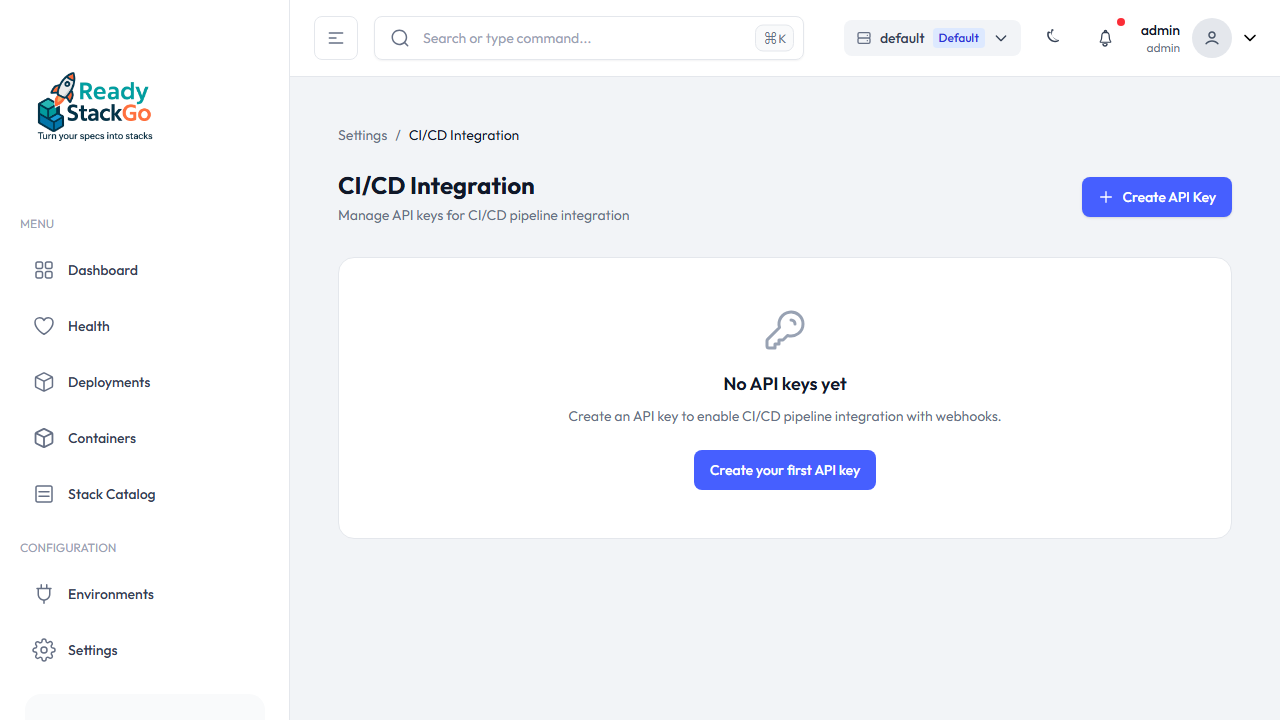
Section titled “Step 2: CI/CD Integration”Click on CI/CD Integration. If no keys have been created yet, you’ll see an empty page with the Create API Key button.
Step 3: Configure Key
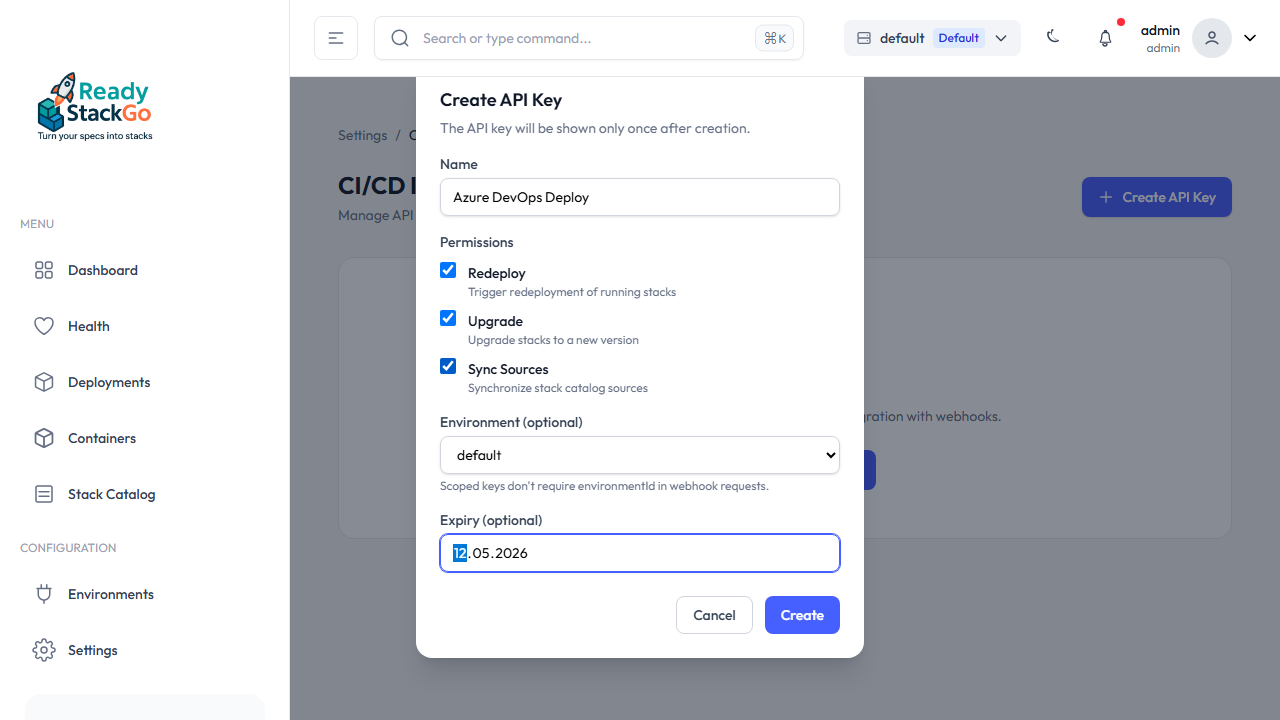
Section titled “Step 3: Configure Key”Click Create API Key and fill in the form:
- Name – A descriptive name (e.g., “Azure DevOps Deploy”)
- Permissions – Select the required permissions:
- Redeploy – Restart the stack with fresh images
- Upgrade – Upgrade the stack to a new catalog version
- Sync Sources – Synchronize catalog sources
- Environment (optional) – Restrict the key to a specific environment
- Expiry (optional) – Set an expiration date
Step 4: Copy the Key
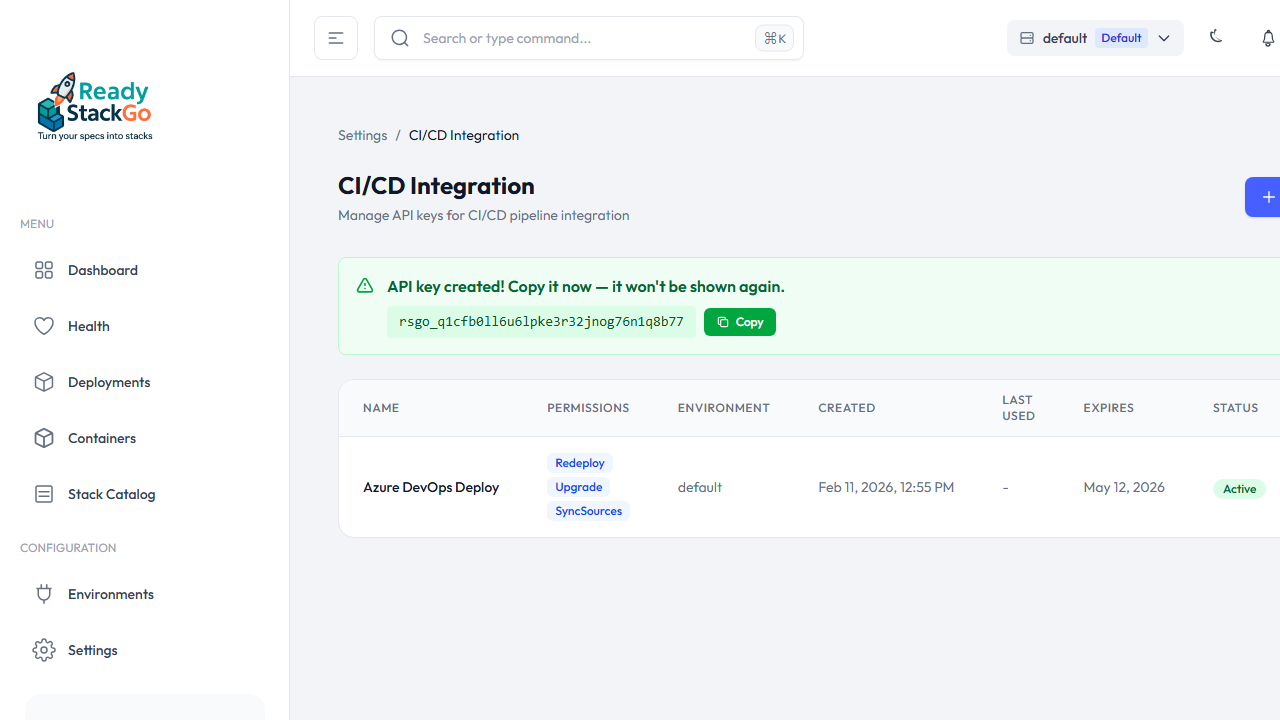
Section titled “Step 4: Copy the Key”After creation, the full API key is displayed once. Copy it immediately – it will not be shown again!
Store the key as a secret in your CI/CD system (e.g., Azure DevOps Variable Group, GitHub Secret).
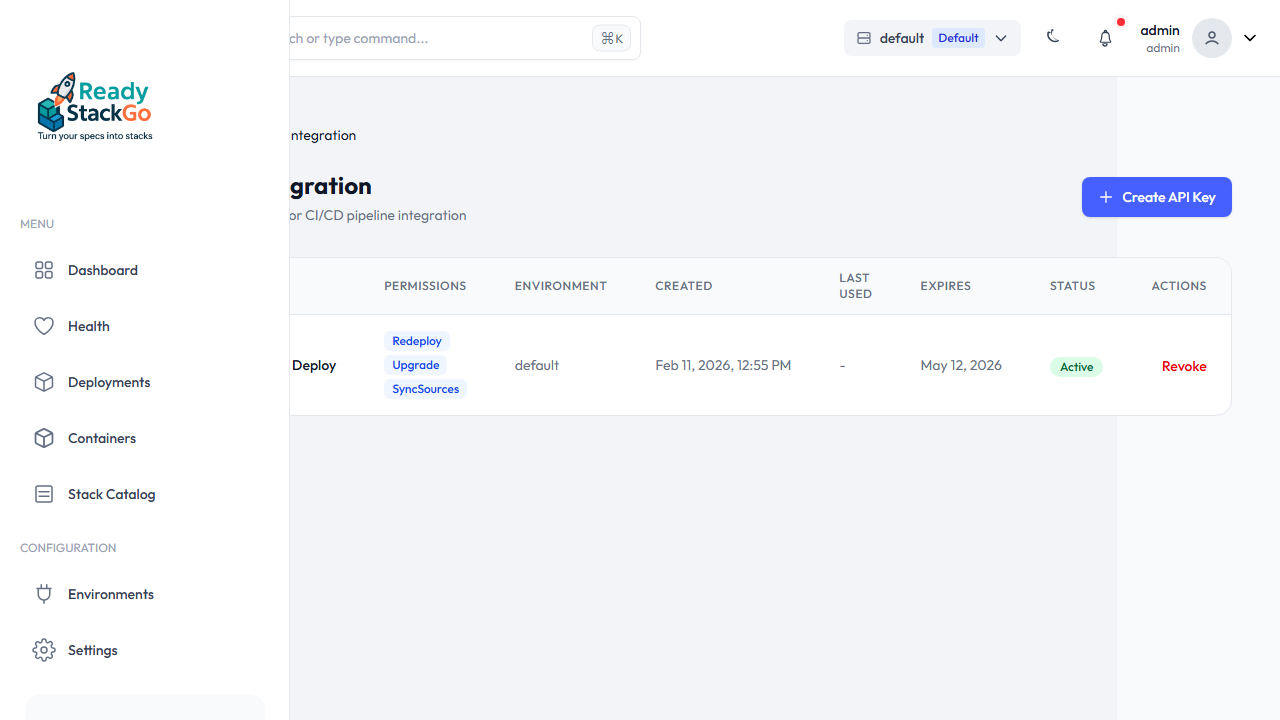
Step 5: Key in the List
Section titled “Step 5: Key in the List”The created key appears in the overview with name, permissions, environment, expiration date, and status.
Webhook Endpoints
Section titled “Webhook Endpoints”All endpoints are located under /api/hooks/ and require API Key authentication via the X-Api-Key header.
POST /api/hooks/redeploy
Section titled “POST /api/hooks/redeploy”Triggers a redeployment of a running stack or product deployment. Stops existing containers, pulls fresh images, and restarts – using the same variables and settings.
Supports two modes:
- Standalone Stack Redeploy: With
stackName– single stack is redeployed - Product Redeploy: With
productId– all or selected stacks of a product deployment are redeployed
Parameters:
| Field | Type | Required | Description |
|---|---|---|---|
stackName | string | Conditional* | Name of the deployed stack. *Required if no productId. |
productId | string | Conditional* | Product GroupId (e.g., ams.project). *Required if no stackName. |
stackDefinitionName | string | No | Only with productId: Name of the stack within the product. If empty: all stacks. |
environmentId | string | No** | Environment ID. **Not required when using an environment-scoped API key. |
variables | object | No | Variable overrides as key-value pairs |
Request (Standalone Stack):
{ "stackName": "ams-project", "environmentId": "abc123-def4-..."}Request (Product – all stacks):
{ "productId": "ams.project"}Request (Product – single stack with overrides):
{ "productId": "ams.project", "stackDefinitionName": "Analytics", "variables": { "BUILD_NUM": "42" }}Response (200) – Stack:
{ "success": true, "message": "Successfully triggered redeploy of 'ams-project'.", "deploymentId": "d4f8b2...", "stackName": "ams-project", "stackVersion": "6.4.0"}Response (200) – Product:
{ "success": true, "message": "Successfully triggered redeploy of product 'AMS Project'.", "productDeploymentId": "p1d2e3...", "stackName": "AMS Project", "stackVersion": "6.4.0"}Error Responses:
// 400 – Neither stackName nor productId{ "success": false, "message": "Either stackName or productId is required." }
// 400 – Stack not found{ "success": false, "message": "No deployment found for stack 'xyz' in environment '...'" }
// 400 – Product deployment not found{ "success": false, "message": "No active product deployment found for product 'xyz' in environment '...'" }
// 400 – Not in Running status{ "success": false, "message": "Only running deployments can be redeployed. Current status: Failed" }
Permission: Hooks.Redeploy
POST /api/hooks/upgrade
Section titled “POST /api/hooks/upgrade”Upgrades a stack to a specific catalog version. Validates the version in the catalog, merges optional new variables, and delegates to the existing upgrade flow.
Parameters:
| Field | Type | Required | Description |
|---|---|---|---|
stackName | string | Yes | Name of the deployed stack |
targetVersion | string | Yes | Target version from the catalog (e.g., "6.5.0") |
environmentId | string | No* | Environment ID. *Not required when using an environment-scoped API key. |
variables | object | No | Additional or changed variables as key-value pairs |
Request:
{ "stackName": "ams-project", "targetVersion": "6.5.0", "environmentId": "abc123-def4-...", "variables": { "NEW_SETTING": "value" }}Response (200):
{ "success": true, "message": "Successfully upgraded 'ams-project' from 6.4.0 to 6.5.0.", "deploymentId": "d4f8b2...", "previousVersion": "6.4.0", "newVersion": "6.5.0"}Error Responses:
// 400 – Version not in catalog{ "success": false, "message": "Version '9.9.9' not found in catalog. Available versions: 6.4.0, 6.5.0" }
// 400 – Stack not in Running status{ "success": false, "message": "Deployment is in status 'Failed', only running deployments can be upgraded." }
Permission: Hooks.Upgrade
POST /api/hooks/sync-sources
Section titled “POST /api/hooks/sync-sources”Synchronizes all stack catalog sources (local directories and Git repositories). Useful after a Git push with updated manifests.
Parameters: No request body required.
Response (200):
{ "success": true, "stacksLoaded": 12, "sourcesSynced": 3, "message": "Synced 3 source(s), loaded 12 stack(s)."}Permission: Hooks.SyncSources
Error Handling
Section titled “Error Handling”| HTTP Status | Meaning |
|---|---|
| 200 | Success |
| 400 | Invalid request (stack not found, invalid version, stack not Running) |
| 401 | Not authenticated (missing or invalid API key) |
| 403 | Not authorized (API key lacks the required permission) |
| 500 | Server error |
Pipeline Examples
Section titled “Pipeline Examples”# Redeploy (fresh images)curl -sf -X POST https://rsgo.example.com/api/hooks/redeploy \ -H "X-Api-Key: rsgo_a1b2c3d4e5f6g7h8i9j0k1l2m3n4o5p6" \ -H "Content-Type: application/json" \ -d '{"stackName": "ams-project"}'
# Sync catalog sourcescurl -sf -X POST https://rsgo.example.com/api/hooks/sync-sources \ -H "X-Api-Key: rsgo_..."
# Upgrade to new versioncurl -sf -X POST https://rsgo.example.com/api/hooks/upgrade \ -H "X-Api-Key: rsgo_..." \ -H "Content-Type: application/json" \ -d '{"stackName": "ams-project", "targetVersion": "6.5.0"}'The -sf flag causes curl to exit with an error code on HTTP failures (401, 403, 500) – important so the pipeline stops on errors.
GitHub Actions
Section titled “GitHub Actions”- name: Trigger Redeploy run: | curl -sf -X POST "${{ secrets.RSGO_URL }}/api/hooks/redeploy" \ -H "X-Api-Key: ${{ secrets.RSGO_API_KEY }}" \ -H "Content-Type: application/json" \ -d '{"stackName": "${{ vars.STACK_NAME }}"}'Azure DevOps
Section titled “Azure DevOps”Inline Call
Section titled “Inline Call”- script: | curl -sf -X POST "$(RSGO_URL)/api/hooks/redeploy" \ -H "X-Api-Key: $(RSGO_API_KEY)" \ -H "Content-Type: application/json" \ -d '{"stackName": "$(STACK_NAME)"}' displayName: Trigger Redeploy on ReadyStackGoYAML Templates (Reusable)
Section titled “YAML Templates (Reusable)”Create reusable templates in your repository:
templates/rsgo-redeploy.yml:
parameters:  - name: stackName    type: string
steps: - script: | curl -sf -X POST "$(RSGO_URL)/api/hooks/redeploy" \ -H "X-Api-Key: $(RSGO_API_KEY)" \ -H "Content-Type: application/json" \ -d '{"stackName": "${{ parameters.stackName }}"}' displayName: Redeploy ${{ parameters.stackName }}templates/rsgo-sync-upgrade.yml:
parameters:  - name: stackName    type: string  - name: targetVersion    type: string
steps:  - script: |      curl -sf -X POST "$(RSGO_URL)/api/hooks/sync-sources" \        -H "X-Api-Key: $(RSGO_API_KEY)"    displayName: Sync Catalog Sources
  - script: |      curl -sf -X POST "$(RSGO_URL)/api/hooks/upgrade" \        -H "X-Api-Key: $(RSGO_API_KEY)" \        -H "Content-Type: application/json" \        -d '{"stackName": "${{ parameters.stackName }}", "targetVersion": "${{ parameters.targetVersion }}"}'    displayName: Upgrade ${{ parameters.stackName }} to ${{ parameters.targetVersion }}
Usage in your pipeline:
steps: - template: templates/rsgo-redeploy.yml parameters: stackName: ams-projectsteps: - template: templates/rsgo-sync-upgrade.yml parameters: stackName: ams-project targetVersion: '6.5.0'Required Pipeline Variables:
| Variable | Type | Description |
|---|---|---|
RSGO_URL | Secret | ReadyStackGo server URL (e.g., https://rsgo.example.com) |
RSGO_API_KEY | Secret | API key with the required permissions |
STACK_NAME | Normal | Name of the stack to deploy (only for inline calls) |
Security
Section titled “Security”- API Keys are stored as SHA-256 hashes in the database
- Keys use the format
rsgo_+ 32 alphanumeric characters (~190 bits of entropy) - Keys can be revoked at any time (Settings → CI/CD → Revoke)
- Optional: Environment scope restricts the key to a specific environment
- Expiration date can be configured per key